By LaimRefund Team · May 31, 2026
Google Play Subscription Refund After 48 Hours: What to Do Next
A Google Play subscription charge after a free trial can feel final once the 48-hour automatic refund window passes, but manual review, developer contact, and payment evidence can still create a path to recovery.
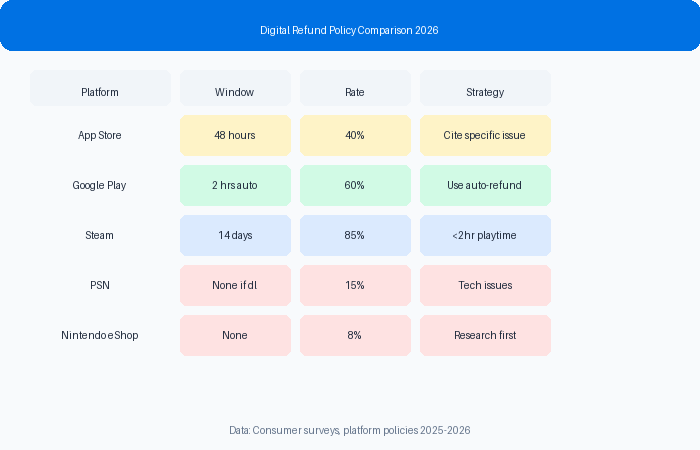
Introduction and Main Problem Explanation
A May 29, 2026 Adobe Community question captured a familiar consumer problem: a user forgot to cancel an Adobe Scan free trial, Google Play charged for an annual subscription, and the customer wanted to know whether contacting the developer within 14 days could still lead to a full refund. That scenario is common because app subscriptions have several overlapping systems: Google Play billing, developer support, app account status, and the card issuer.
The mistake many consumers make is treating the 48-hour Google Play window as the whole refund system. It is an important automatic-review window, but it does not answer every manual case. A customer may still have arguments based on accidental renewal, unused service, unclear trial disclosure, technical inability to cancel, duplicate subscription, or developer authorization for refund. The path is just less automatic.
The second mistake is contacting the wrong party with incomplete information. If Google Play billed the subscription, the order ID matters. If the developer controls entitlement or can approve a refund, the app account email matters. If the bank is later asked to review the charge, the timeline and merchant denial matter. A good appeal should make all three systems understandable.
Consumers should also avoid exaggerating. A forgotten cancellation is not automatically an unauthorized charge. But if the trial reminder was unclear, the annual price was not prominent, the account was unused, or cancellation instructions were confusing, those facts may support a refund request. Precision is more credible than claiming fraud when the issue is really renewal confusion.
Write down the exact purchase date, charge amount, order number, merchant name, and payment method before you contact support. Refund agents look for clean identifiers first because a vague complaint forces them to search across several systems.
Save screenshots before you start the dispute. Capture the policy page, confirmation email, cancellation page, error screen, itinerary notice, or subscription renewal message. A screenshot taken after the company changes a page is weaker than one taken the day the issue happened.
Separate facts from emotion. A strong refund appeal says what was promised, what changed, what evidence proves the gap, and what remedy you want. Anger may be understandable, but it does not help a support agent classify the case.
Ask for a specific remedy. If you want a cash refund, say cash refund. If you want fees returned, list the fees. If you accept a partial credit only as a fallback, make that fallback clear so the company cannot treat a small voucher as full settlement.
Keep a timeline. The timeline should include purchase, first problem, first support contact, company response, second attempt, and any final denial. A timeline makes escalation easier because a supervisor can see that you acted promptly and gave the company a chance to fix the issue.
This is exactly the type of query people search after the charge appears: Google Play refund after 48 hours, Google Play annual subscription refund, Adobe Scan refund Google Play, free trial charged annual plan refund, and developer approved refund Google Play. A useful guide should show the order of operations.
Google Play cases are easier when you know the difference between cancellation and refund. Cancellation stops the next renewal, but it usually does not reverse the current charge. Refund review asks Google or the developer to unwind money that already moved. Many users cancel, assume a refund is coming, then lose days before realizing they never submitted a refund request. Do both actions and save confirmation of each.
If the app was unused after renewal, say that plainly. Usage is not the only factor, but it is relevant. A support reviewer may view an unused annual plan differently from a plan that was used heavily for weeks after renewal. If you opened the app only to cancel or check account status, explain that limited use so it is not misread as normal subscription use.
Developer communication should be concise. Send the GPA order number, account email, charge date, amount, and reason. Ask whether they can approve a refund or provide a written statement supporting Google Play review. Avoid sending a long emotional story in the first developer message because the support team may only need identifiers and a clear request to locate the subscription.
If Google Play denies the request, preserve the denial text. The denial is not just bad news; it is evidence that you tried the platform process. A second appeal or payment dispute is stronger when it shows the date of the first request, the reason given, and the new evidence you are adding. Treat every denial as a document in the case file.
Step-by-Step Guide
- Open Google Play order history and copy the GPA order number, purchase date, subscription name, renewal amount, and billing account.
- Check whether the subscription is still active and cancel it immediately so another renewal cannot happen while the refund is reviewed.
- Write a short timeline: trial signup date, trial end date, charge date, cancellation date, first refund request, and any developer contact.
- Submit the Google Play refund request first if you are still close to the charge date, even if you think the automatic window may have passed.
- Contact the developer with the GPA order number and ask whether they can authorize or support a refund because the annual plan was unintended or unused.
- If Google denies the first request, reply or resubmit with more specific evidence: unused service, unclear disclosure, failed cancellation, or developer approval.
- If the developer supports the refund, save that response and send it back to Google Play because platform billing may still control the actual reversal.
- Consider a card dispute only after Google and the developer have had a chance to review the evidence, and be aware it may affect your app or Google account access.
The order matters because each party controls a different lever. Google controls platform billing, the developer controls app-side support, and the card issuer reviews payment disputes only after the merchant process looks exhausted.
Comparison Table
| Path | Use When | What to Attach | Expected Weakness |
|---|---|---|---|
| Google Play refund request | Charge is recent or platform billed it | GPA order ID and reason | Automatic window may deny quickly |
| Developer support | App service was unused or renewal was confusing | Order ID, account email, timeline | Developer may say Google controls billing |
| Manual appeal | First request denied | Policy, screenshots, developer reply | Requires clearer evidence |
| Card dispute | Merchant/platform process failed | Denials, receipts, cancellation proof | May affect account access or subscriptions |
Checklist and Security Callout
A Google Play subscription appeal should be short, specific, and order-number driven.
- GPA order ID is included.
- Subscription is cancelled before appeal.
- Trial and charge dates are listed.
- Developer response is saved if available.
- Reason is precise: unintended annual renewal, unused service, unclear disclosure, or failed cancellation.
- The appeal avoids calling the charge fraud unless it truly was unauthorized.
Tip: If the developer says they are willing to refund but Google controls payment, ask for that statement in writing. A written developer approval can make a manual Google Play appeal stronger.
Product Connection
LaimRefund is useful when a Google Play denial arrives in seconds and gives no real explanation. You can enter the order ID, amount, trial facts, and denial language, then generate a more complete appeal that asks for manual review.
The tool also helps separate platform and developer responsibility. That saves time because you can send Google the billing argument and send the developer the app-service argument without mixing both into one confusing message.
Scan your domain now. Ten seconds.
FAQ Section
Can Google Play refund a subscription after 48 hours?
Yes, it is possible in some manual cases, but it is not guaranteed. The appeal needs stronger facts than a normal automatic refund request, such as unused service, unclear renewal terms, or developer support.
Should I contact Adobe or Google Play for an Adobe Scan subscription refund?
If Google Play billed the charge, start with Google Play and also contact Adobe support with the GPA order number. The developer may not process the payment directly but can sometimes support the case.
What should I write if I forgot to cancel a free trial?
Be honest and specific. Say when you signed up, when the charge posted, whether the service was used, whether the annual price was clear, and what refund you are requesting.
Will a chargeback hurt my Google account?
It can create account or subscription issues, depending on the platform response. Try Google Play and developer escalation first, then use a card dispute only with a complete evidence packet.
Does cancelling the subscription give me a refund automatically?
No. Cancellation usually stops future billing. A refund for the current charge requires a separate refund request or support review.
Related Internal Links
- Google Play's 48-Hour Refund Window Is Kind of a Lie
- How to Actually Talk to a Human at Google Play Support
- Check Your Refund Case
Source: Adobe Community (May 29, 2026). User asks about an Adobe Scan annual subscription refund after a Google Play trial charge
More Refund Guides
Google Cloud overcharged due to a misconfigured resource. Learn how to get your money back....
Qantas gave me a travel credit after cancelling my flight. Learn how to get your money back....
I want to share how I got $248 back from Roblox...